 OpenStreetMap
andrewwiseman's Comments
| Changeset | When | Comment |
|---|---|---|
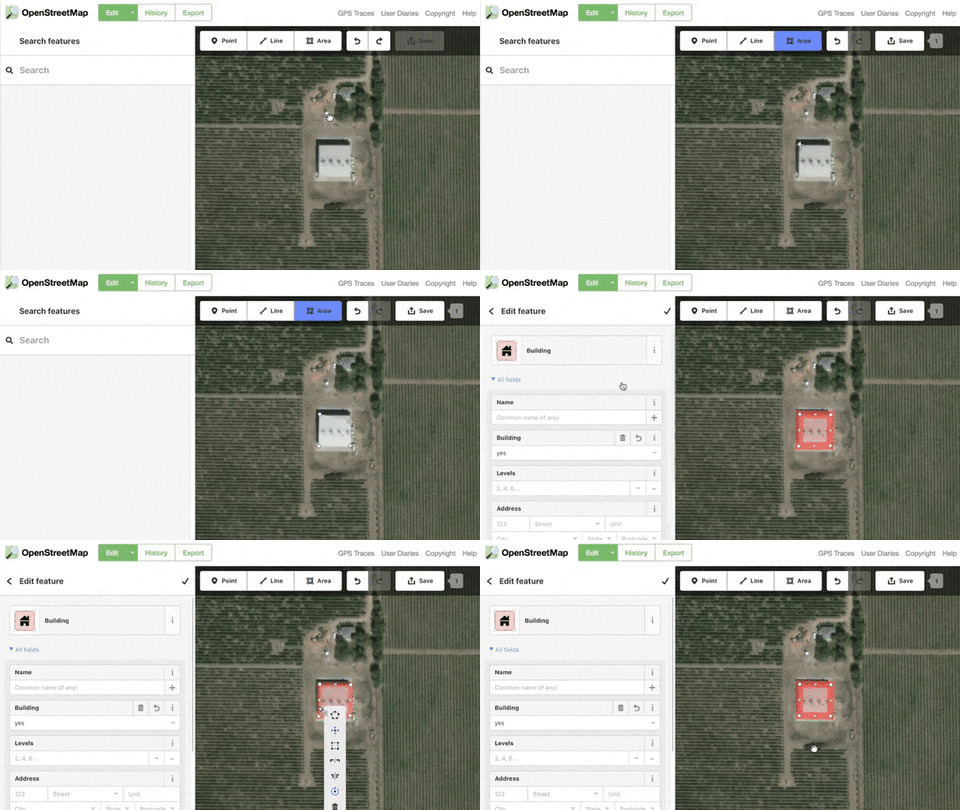
| 61540863 | Thanks for mapping! Don't forget to square the corners of your buildings, they should almost always be 90 degrees. To do that click on the building and click the s key on your keyboard. Here's a gif that shows what it looks like https://media.giphy.com/media/9V3I96bqVZ0K9BKZsq/giphy.gif
|
|
| 61541032 | Thanks for mapping! However don't forget to square the corners of your buildings by clicking the s key on your keyboard. Most buildings will be either square or rectangular and there are some crooked shapes here |
|
| 61541033 | Thanks for mapping! However don't forget to square the corners of your buildings by clicking the s key on your keyboard. Most buildings will be either square or rectangular and there are some crooked shapes here |
|
| 61541179 | Thanks for mapping! However don't forget to square the corners of your buildings by clicking the s key on your keyboard. Most buildings will be either square or rectangular and there are some crooked shapes here |
|
| 61541256 | Thanks for mapping! However don't forget to square the corners of your buildings by clicking the s key on your keyboard. Most buildings will be either square or rectangular and there are some funny crooked shapes here |
|
| 61541306 | Thanks for mapping! However don't forget to square the corners of your buildings by clicking the s key on your keyboard. Most buildings will be either square or rectangular and there are some crooked shapes here |
|
| 61541320 | Thanks for mapping! However don't forget to square the corners of your buildings by clicking the s key on your keyboard. Most buildings will be either square or rectangular and there are some funny crooked shapes here |
|
| 61541370 | Thanks for mapping! However don't forget to square the corners of your buildings by clicking the s key on your keyboard. Most buildings will be either square or rectangular and there are some funny crooked shapes here |
|
| 61542721 | Looks great! Thanks for mapping |
|
| 61543219 | Thanks for mapping! However don't forget to square the corners of your buildings by clicking the s key on your keyboard. Most buildings will be either square or rectangular or L-shaped and there are some funny crooked angles here |
|
| 61543253 | Thanks for mapping! However don't forget to square the corners of your buildings by clicking the s key on your keyboard. Most buildings will be either square or rectangular and there are some funny crooked shapes here |
|
| 61543751 | Thanks for mapping! Looks great, please keep mapping! |
|
| 61543840 | Thanks for mapping! Looks great, please keep it up! |
|
| 61543845 | Looks great! Thanks for mapping, please keep it up! |
|
| 61543849 | Thanks for mapping! However don't forget to square the corners of your buildings by clicking the s key on your keyboard. Most buildings will be either square or rectangular and I'm seeing some funny crooked shapes |
|
| 61543876 | Thanks for mapping. However make sure to tag buildings as "building" -- they will turn pink. If it is white colored then it's just a shape without any info. |
|
| 61543878 | Looks great! Thanks for mapping, please keep it up |
|
| 61543538 | Looks great, thanks for mapping! |
|
| 61543541 | Looks awesome, thanks for mapping! |
|
| 61543570 | Thanks for mapping! One reminder, make sure to click the ’s’ key on their keyboard after tagging it as a building. That will make sure the corners are 90 degrees. I’m seeing a few buildings that are funny crooked shapes. Thanks! |